[//]: # (docker-finance | modern accounting for the power-user)
[//]: # ()
[//]: # (Copyright [C] 2021-2024 Aaron Fiore [Founder, Evergreen Crypto LLC])
[//]: # ()
[//]: # (This program is free software: you can redistribute it and/or modify)
[//]: # (it under the terms of the GNU General Public License as published by)
[//]: # (the Free Software Foundation, either version 3 of the License, or)
[//]: # ([at your option] any later version.)
[//]: # ()
[//]: # (This program is distributed in the hope that it will be useful,)
[//]: # (but WITHOUT ANY WARRANTY; without even the implied warranty of)
[//]: # (MERCHANTABILITY or FITNESS FOR A PARTICULAR PURPOSE. See the)
[//]: # (GNU General Public License for more details.)
[//]: # ()
[//]: # (You should have received a copy of the GNU General Public License)
[//]: # (along with this program. If not, see .)
# [ ](https://evergreencrypto.co "docker-finance")
> Looking for a Quickstart? Skip to [Installation](#installation).
1. **[What does it do?](#what-does-it-do)**
- [Overview](#overview)
- [Highlights](#highlights)
- [Screenshots](#screenshots)
2. **[What is supported?](#what-is-supported)**
- [CeFi (centralized custodians)](#cefi)
- [DeFi (decentralized ecosystems)](#defi)
- [TradFi (traditional institutions)](#tradfi)
- [NonFi (non-financial services)](#nonfi)
- [Prices (market price data)](#prices)
3. **[How do I get started?](#how-do-i-get-started)**
- [Installation](#installation)
- [Environment Generation](#environment-generation)
- [Configuration Files](#configuration-files)
4. **[How do I use it?](#how-do-i-use-it)**
- [Mostly-Unified CLI](#mostly-unified-cli)
- [Flow Layout](#flow-layout)
- [Caveats & Oddities](#caveats--oddities)
5. **[How do I contribute?](#how-do-i-contribute)**
- [Donate](#donate)
- [Development](#development)
6. **[How do I connect?](#how-do-i-connect)**
- [`#docker-finance:matrix.org`](#docker-financematrixorg)
- [Evergreen Crypto LLC](#evergreen-crypto-llc)
7. **[Where is the legalese?](#where-is-the-legalese)**
- [License and Disclaimer](#license-and-disclaimer)
## What does it do?
Cryptocurrency, legacy banking, tax preparation, metadata analysis & more!
### Overview
`docker-finance` gives you the power of a privacy-focused, highly uniform system of financial management - but with a modern twist.
Cryptocurrencies & blockchain metadata are unified with legacy finance to create a world of best-practice accounting in a highly flexible, time-tested environment.
### Highlights
- [Highly granular plaintext accounting](#ledger-command)
- [Blockchain explorers](#defi)
- [Cryptocurrency wallets](#wallets)
- [Cryptocurrency exchanges](#cefi)
- [Traditional financial institutions](#tradfi)
- [Visualize your metadata with a high-powered physics framework](#meta-w-root-c-analysis)
- Privacy-aware instance generates (and stores) your visualizations locally
- [Interactive C++ interpreter](#root-cli-w-c-api) allows complex analysis with efficiency
- [Report generation](#reports) & [tax preparation](#taxes)
- Cryptocurrency income from interest and staking
- Cryptocurrency spending and network fees
- Capital gains/losses across all accounts
- Income statements, balance sheets and more
- [Automated data procurement & aggregation into meaningful journals](#fetch)
- Use network APIs to [`fetch`](#fetch) account CSV data or market prices
- Manually drop-in your institutions' CSVs (for accounts w/out remote API)
- Import all journals with a single command to create a unified journal
- Enjoy using your client's (host's) `crontab` for the [container's suite of commands](#help-suite-of-commands)
- [Unique & customizable environments for your individual needs](#image-docker-finance)
- Versatile: create unlimited profiles for any number of groups and users
- Flexible: while automation is useful, so is the manual entry framework
- Private: all of your accounts are under your control; not a 3rd party
- Secure: all financial activity is managed within a Docker container
- Anonymous: [Tor](https://www.torproject.org/) support is available for all [`fetch`](#fetch) functionality
- [Developer-friendly environment that keeps you in the zone](#image-dev-tools)
- A [plugins](#plugins) framework allows for maximum extensibility
- See the [Development](#development) section for details
### Screenshots
#### Client (Host)
The *docker* in `docker-finance`.
##### *image: docker-finance*
[
](https://evergreencrypto.co "docker-finance")
> Looking for a Quickstart? Skip to [Installation](#installation).
1. **[What does it do?](#what-does-it-do)**
- [Overview](#overview)
- [Highlights](#highlights)
- [Screenshots](#screenshots)
2. **[What is supported?](#what-is-supported)**
- [CeFi (centralized custodians)](#cefi)
- [DeFi (decentralized ecosystems)](#defi)
- [TradFi (traditional institutions)](#tradfi)
- [NonFi (non-financial services)](#nonfi)
- [Prices (market price data)](#prices)
3. **[How do I get started?](#how-do-i-get-started)**
- [Installation](#installation)
- [Environment Generation](#environment-generation)
- [Configuration Files](#configuration-files)
4. **[How do I use it?](#how-do-i-use-it)**
- [Mostly-Unified CLI](#mostly-unified-cli)
- [Flow Layout](#flow-layout)
- [Caveats & Oddities](#caveats--oddities)
5. **[How do I contribute?](#how-do-i-contribute)**
- [Donate](#donate)
- [Development](#development)
6. **[How do I connect?](#how-do-i-connect)**
- [`#docker-finance:matrix.org`](#docker-financematrixorg)
- [Evergreen Crypto LLC](#evergreen-crypto-llc)
7. **[Where is the legalese?](#where-is-the-legalese)**
- [License and Disclaimer](#license-and-disclaimer)
## What does it do?
Cryptocurrency, legacy banking, tax preparation, metadata analysis & more!
### Overview
`docker-finance` gives you the power of a privacy-focused, highly uniform system of financial management - but with a modern twist.
Cryptocurrencies & blockchain metadata are unified with legacy finance to create a world of best-practice accounting in a highly flexible, time-tested environment.
### Highlights
- [Highly granular plaintext accounting](#ledger-command)
- [Blockchain explorers](#defi)
- [Cryptocurrency wallets](#wallets)
- [Cryptocurrency exchanges](#cefi)
- [Traditional financial institutions](#tradfi)
- [Visualize your metadata with a high-powered physics framework](#meta-w-root-c-analysis)
- Privacy-aware instance generates (and stores) your visualizations locally
- [Interactive C++ interpreter](#root-cli-w-c-api) allows complex analysis with efficiency
- [Report generation](#reports) & [tax preparation](#taxes)
- Cryptocurrency income from interest and staking
- Cryptocurrency spending and network fees
- Capital gains/losses across all accounts
- Income statements, balance sheets and more
- [Automated data procurement & aggregation into meaningful journals](#fetch)
- Use network APIs to [`fetch`](#fetch) account CSV data or market prices
- Manually drop-in your institutions' CSVs (for accounts w/out remote API)
- Import all journals with a single command to create a unified journal
- Enjoy using your client's (host's) `crontab` for the [container's suite of commands](#help-suite-of-commands)
- [Unique & customizable environments for your individual needs](#image-docker-finance)
- Versatile: create unlimited profiles for any number of groups and users
- Flexible: while automation is useful, so is the manual entry framework
- Private: all of your accounts are under your control; not a 3rd party
- Secure: all financial activity is managed within a Docker container
- Anonymous: [Tor](https://www.torproject.org/) support is available for all [`fetch`](#fetch) functionality
- [Developer-friendly environment that keeps you in the zone](#image-dev-tools)
- A [plugins](#plugins) framework allows for maximum extensibility
- See the [Development](#development) section for details
### Screenshots
#### Client (Host)
The *docker* in `docker-finance`.
##### *image: docker-finance*
[ ](.img/examples/client_00.png "") [
 ](.img/examples/client_01.png "") [
 ](.img/examples/client_02.png "") [
 ](.img/examples/client_03.png "") [
 ](.img/examples/client_04.png "")
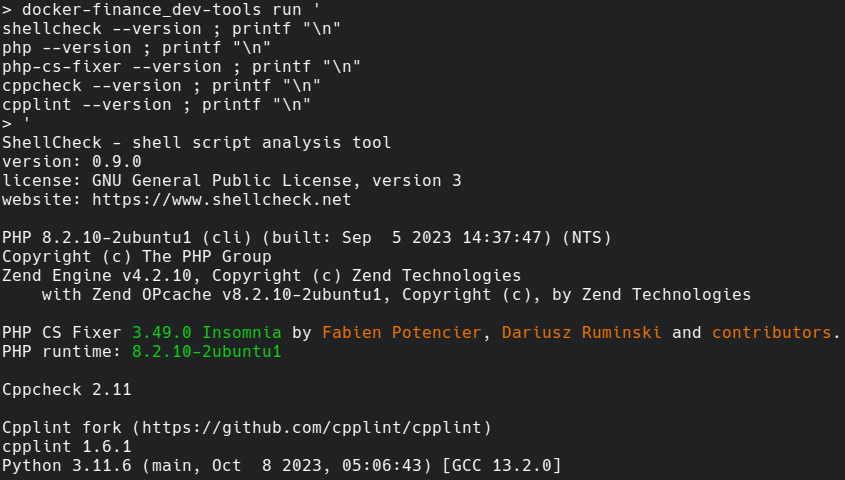
##### *image: dev-tools*
[
](.img/examples/client_04.png "")
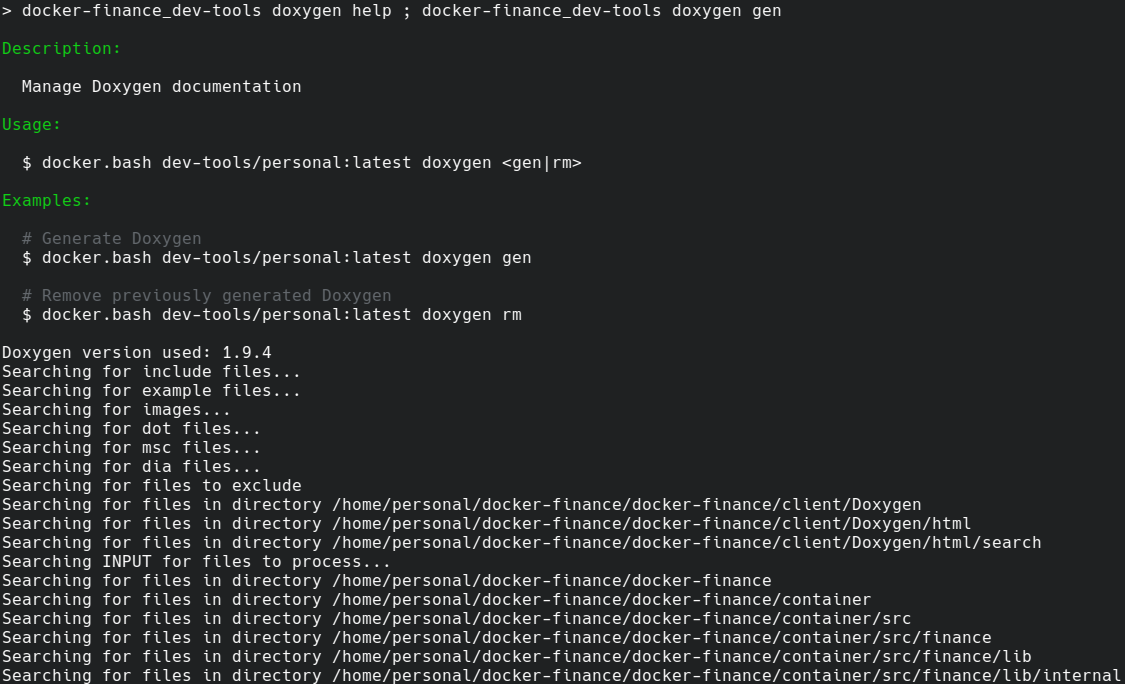
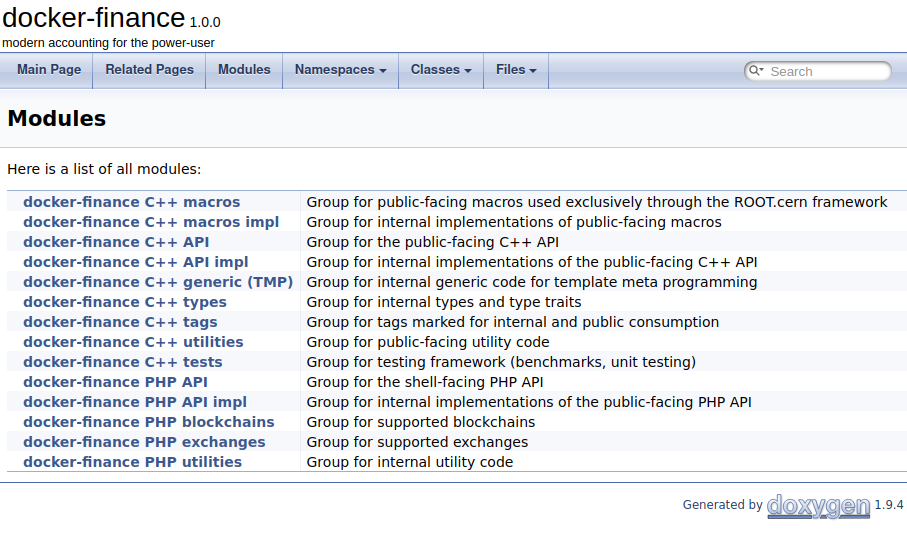
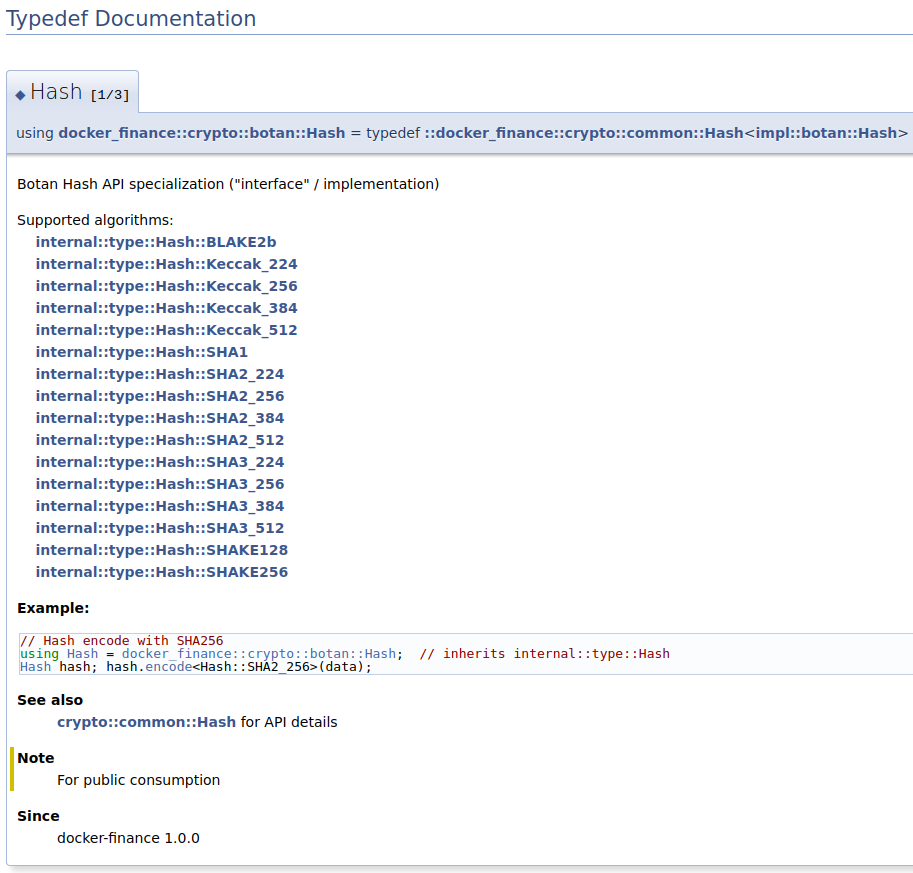
##### *image: dev-tools*
[ ](.img/examples/client_dev-tools_00.png "") [
 ](.img/examples/client_dev-tools_01.png "") [
 ](.img/examples/client_dev-tools_02.png "") [
 ](.img/examples/client_dev-tools_03.png "") [
 ](.img/examples/client_dev-tools_04.png "")
[
](.img/examples/client_dev-tools_04.png "")
[ ](.img/examples/client_dev-tools_05.png "") [
 ](.img/examples/client_dev-tools_06.png "") [
 ](.img/examples/client_dev-tools_07.png "") [
 ](.img/examples/client_dev-tools_08.png "") [
 ](.img/examples/client_dev-tools_09.png "")
#### Container
The *finance* in `docker-finance`.
##### *Fetch*
[
](.img/examples/client_dev-tools_09.png "")
#### Container
The *finance* in `docker-finance`.
##### *Fetch*
[ ](.img/examples/fetch_00.png "") [
 ](.img/examples/fetch_01.png "") [
 ](.img/examples/fetch_02.png "") [
 ](.img/examples/fetch_03.png "") [
 ](.img/examples/fetch_04.png "")
##### *Ledger (command)*
[
](.img/examples/fetch_04.png "")
##### *Ledger (command)*
[ ](.img/examples/ledger_00.png "") [
 ](.img/examples/ledger_01.png "") [
 ](.img/examples/ledger_02.png "") [
 ](.img/examples/ledger_03.png "") [
 ](.img/examples/ledger_04.png "")
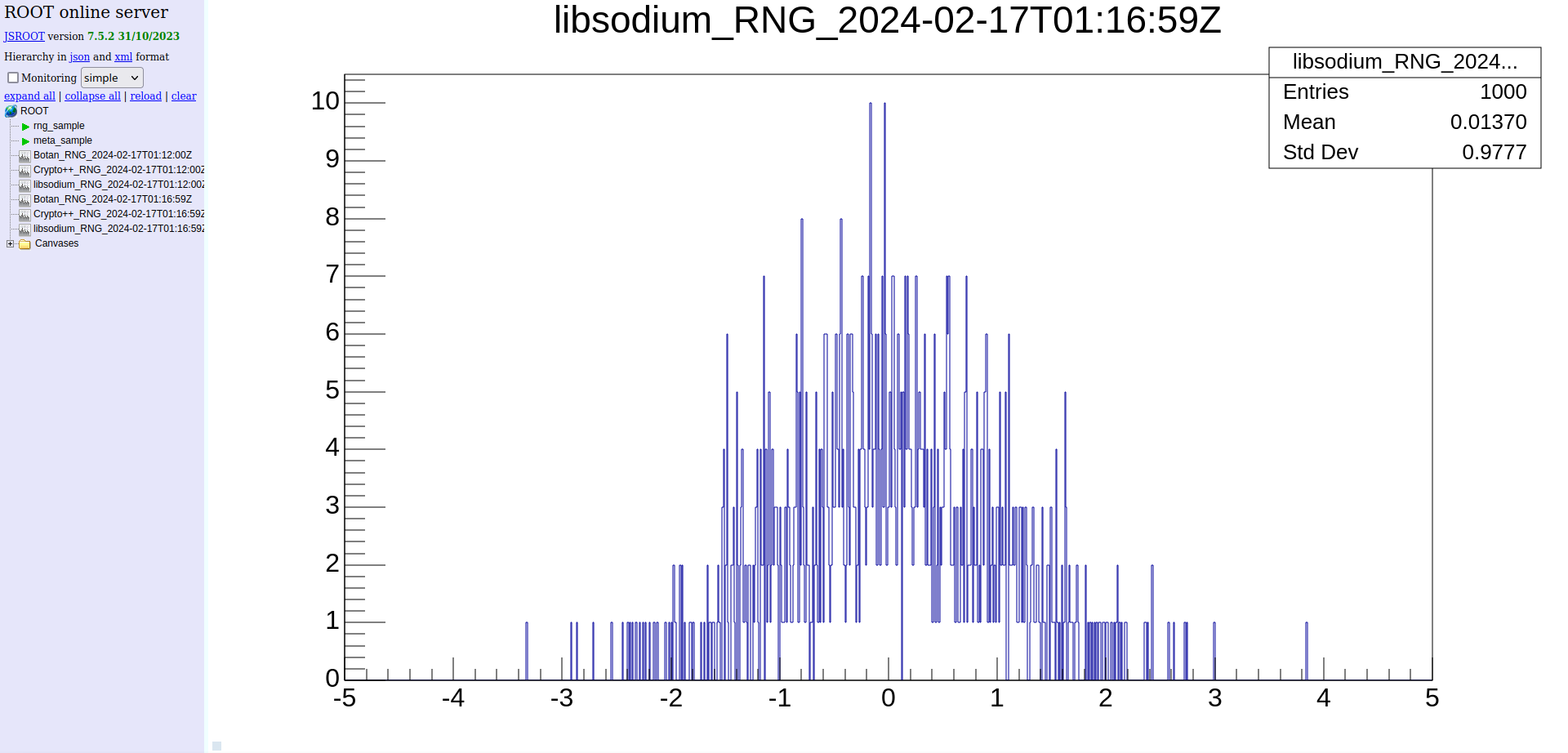
##### *Meta (w/ ROOT C++ analysis)*
[
](.img/examples/ledger_04.png "")
##### *Meta (w/ ROOT C++ analysis)*
[ ](.img/examples/meta_00.png "") [
 ](.img/examples/meta_01.png "") [
 ](.img/examples/meta_02.png "") [
 ](.img/examples/meta_03.png "") [
 ](.img/examples/meta_04.png "")
##### *ROOT (CLI w/ C++ API)*
[
](.img/examples/meta_04.png "")
##### *ROOT (CLI w/ C++ API)*
[ ](.img/examples/root_00.png "") [
 ](.img/examples/root_01.png "") [
 ](.img/examples/root_02.png "") [
 ](.img/examples/root_03.png "") [
 ](.img/examples/root_04.png "")
##### *Taxes*
[
](.img/examples/root_04.png "")
##### *Taxes*
[ ](.img/examples/taxes_00.png "") [
 ](.img/examples/taxes_01.png "") [
 ](.img/examples/taxes_02.png "") [
 ](.img/examples/taxes_03.png "") [
 ](.img/examples/taxes_04.png "")
##### *Reports*
[
](.img/examples/taxes_04.png "")
##### *Reports*
[ ](.img/examples/reports_00.png "") [
 ](.img/examples/reports_01.png "") [
 ](.img/examples/reports_02.png "") [
 ](.img/examples/reports_03.png "") [
 ](.img/examples/reports_04.png "")
##### *Help (suite of commands)*
[
](.img/examples/reports_04.png "")
##### *Help (suite of commands)*
[ ](.img/examples/container_help_00.png "") [
 ](.img/examples/container_help_01.png "") [
 ](.img/examples/container_help_02.png "") [
 ](.img/examples/container_help_03.png "") [
 ](.img/examples/container_help_04.png "")
[
](.img/examples/container_help_04.png "")
[ ](.img/examples/container_help_05.png "") [
 ](.img/examples/container_help_06.png "") [
 ](.img/examples/container_help_07.png "") [
 ](.img/examples/container_help_08.png "") [
 ](.img/examples/container_help_09.png "")
## What is supported?
Plaintext accounting gives you the power to manage any number of assets or accounts.
However, for accounts that require fetch/import functionality, only the following are supported:
### CeFi
#### Regularly maintained
- [X] [Coinbase](https://coinbase.com/)
- [X] [Gemini](https://gemini.com/)
- [X] [PayPal](https://paypal.com/)
- [X] [Crypto](https://www.paypal.com/us/digital-wallet/manage-money/crypto/)
- [X] [Fiat](https://developer.paypal.com/docs/reports/reference/paypal-supported-currencies/)
#### Available but requires community maintenance
- [X] [Bittrex](https://bittrex.com/) *(non-US)*
- [X] [Changelly](https://changelly.com/)
- [X] [Coinbase Pro](https://pro.coinbase.com/) *("Sunsetted")*
- [X] [Kraken](https://kraken.com/) *(non-WA)*
- [X] [Lofty.ai](https://lofty.ai/)
- [X] [Nexo](https://nexo.com/) *(non-US)*
#### Available but no longer maintained
- [X] BlockFi *(bankrupt)*
- [X] Celsius Network *(bankrupt)*
### DeFi
#### Blockchain explorers / Ecosystems
Supported blockchains (independent of wallet type):
- [X] [Algorand](https://algorand.com/) *(powered by [AlgoNode.io](https://algonode.io/))*
- [ ] Cardano
- [X] Ethereum-based
- [ ] Arbitrum
- [X] [Ethereum](https://ethereum.org/) *(powered by [Etherscan.io APIs](https://etherscan.io/))*
- [X] [1inch](https://1inch.io/)
- [X] [Aave](https://aave.com/)
- [X] [AirSwap](https://about.airswap.io/)
- [X] [Compound](https://compound.finance/)
- [ ] Lido
- [X] [Rocket Pool](https://rocketpool.net/)
- [X] [Uniswap](https://uniswap.org/)
- [ ] Optimism
- [X] [Polygon](https://polygon.technology/) *(powered by [PolygonScan APIs](https://polygonscan.com/))*
- [X] [Tezos](https://tezos.com/) *(powered by [TzKT API](https://tzkt.io/))*
#### Self-hosting
- [X] [BTCPayServer](https://btcpayserver.org/)
#### Wallets
##### *Software*
- [X] [Coinbase Commerce (self-managed)](https://www.coinbase.com/commerce/)
- [X] [Coinbase Wallet](https://www.coinbase.com/wallet/)
- [X] [Coinomi](https://www.coinomi.com/)
- [X] [Electrum](https://electrum.org/)
- [X] [Metamask](https://metamask.io/)
- [X] [Pera Algo Wallet](https://perawallet.app/)
##### *Hardware*
- [X] [Ledger](https://www.ledger.com/)
- [X] [Trezor](https://trezor.io/)
##### *Web*
- [X] [AdaLite](https://adalite.io)
### TradFi
#### Regularly maintained
- [X] [Ally](https://www.ally.com/)
- [X] [Bank](https://www.ally.com/bank/)
- [X] [Capital One](https://www.capitalone.com/)
- [X] [Bank](https://www.capitalone.com/bank/online-banking/)
- [X] [Credit](https://www.capitalone.com/credit-cards/)
- [X] [Chase](https://www.chase.com/)
- [X] [Bank](https://personal.chase.com/personal/checking/)
- [X] [Credit](https://creditcards.chase.com/)
- [X] [Discover](https://www.discover.com/)
- [X] [Bank](https://www.discover.com/online-banking/)
- [X] [Credit](https://www.discover.com/credit-cards/)
- [X] [PayPal Business](https://business.paypal.com/)
- [X] [Fiat](https://developer.paypal.com/docs/reports/reference/paypal-supported-currencies/)
#### Requires community maintenance
- [X] [ETrade](https://www.etrade.com/)
- [X] [Brokerage](https://us.etrade.com/what-we-offer/our-accounts/brokerage-account)
### NonFi
#### Cloud Services
- [X] [Vultr](https://www.vultr.com/)
### Prices
- [X] [Cryptocurrency](https://www.coingecko.com/)
- [X] [CoinGecko](https://www.coingecko.com/en/api)
- [X] [Mobula](https://docs.mobula.io/introduction)
- [ ] Traditional markets
## How do I get started?
### Installation
`docker-finance` is not your typical Docker image in which you simply pull and containerize, but rather it's an *image-based* accounting system that operates transparently between your client (host) and container; keeping your finances containerized, with all the benefits of containerization.
`docker-finance` *should* work out-of-the-box on any modern Linux system. For example, if your client (host) is Ubuntu, the default installation of `coreutils`, `shells` and `utils` that came with your system will satisfy requirements. However, you'll still need to manually install Docker (see below).
1. **Install dependencies**:
1. [Docker Engine](https://docs.docker.com/engine/install/#supported-platforms) with [post-install configuration](https://docs.docker.com/engine/install/linux-postinstall/)
- Latest version (or at least `27.1.1`)
2. [GNU Bash](https://www.gnu.org/software/bash/)
- Latest version (or at least `5.0.17`)
- Installed by *default* on most Linux distributions
3. [Git](https://git-scm.com/book/en/v2/Getting-Started-Installing-Git/)
- Latest version (or at least `2.25.1`)
- Only needed for step 3 but should be kept in order to:
- Remain up-to-date with future `docker-finance` versions
- Safely track your workflow related data (journals, metadata, etc.)
2. **Install recommended** (optional):
Although *not* required, consider the following for workflow efficiency:
- A terminal multiplexer like [tmux](https://github.com/tmux/tmux/wiki) or [screen](https://www.gnu.org/software/screen/)
- A terminal file manager like [mc](https://midnight-commander.org/) (Midnight Commander)
3. **Prepare your repository**:
Pick a *persistent* path that you're likely to keep; your environment will be aliased/sourced to the path you choose.
```bash
if hash git &>/dev/null; then
if [ -d docker-finance ]; then
if pushd docker-finance &>/dev/null; then
if ! git pull --tags; then
echo "FATAL: docker-finance repo not pulled" >&2
fi
popd 1>/dev/null
else
echo "FATAL: docker-finance repo not found" >&2
fi
else
if ! git clone https://gitea.com/EvergreenCrypto/docker-finance; then
echo "FATAL: docker-finance repo not cloned" >&2
fi
fi
else
echo "FATAL: git not found" >&2
fi
```
4. **Verify your repository** (optional):
```bash
if pushd docker-finance/ 1>/dev/null; then
gpg --keyserver hkp://keyserver.ubuntu.com --recv-key 518A22F85BEFD32BCC99C48603F90C4F35E0213E \
&& git verify-commit $(git log -n1 --pretty=format:"%H") \
&& echo -e "\nSUCCESS: now confirm matching key = 518A22F85BEFD32BCC99C48603F90C4F35E0213E" \
|| echo -e "\nFATAL: no key available or possible MITM - do not use!"
popd 1>/dev/null
fi
```
5. **Prepare your shell environment**:
The following install convenience aliases and command completion to your shell environment (see [install.bash](client/install.bash) for details).
```bash
./docker-finance/client/install.bash && source ~/.bashrc
```
- After your first image is built (step 7), you can use commandline completion for all `docker-finance` images and image-based commands
- The `dfi` alias of `docker-finance` is the recommended alias to use for for all client/container operations
6. **Generate client/container environment**:
The following will generate your Docker-related client/container environment for the default image (see [Environment Generation](#environment-generation) for details):
```bash
dfi archlinux/${USER}:default gen all=all
```
> To regenerate any step in this process, now or in the future, use `gen help` for available options
> To use the `ubuntu` image instead, replace `archlinux` with `ubuntu` here and for all remaining steps
7. **Build default `docker-finance` image**:
```bash
dfi archlinux/${USER}:default build type=default
```
> Use the `build help` command for available options (such as smaller, faster builds)
8. **Bring up container of default `docker-finance` image**:
```bash
dfi archlinux/${USER}:default up
```
> You can use tab completion for all `dfi ` commands (but only for built images). See `dfi help` for commands.
9. **You're inside!** See [How do I use it?](#how-do-i-use-it) for next steps.
10. (Optional) **Developers: on your client (host), build and setup the `dev-tools` platform**:
```bash
dfi dev-tools/${USER}:default build type=default && dfi dev-tools/${USER}:default gen all=all
```
### Environment Generation
`docker-finance`'s environment consists of two scopes: `client` and `container`. The client (host) view is confined to the host while the container view confined to the container (though the client *can*, at times, view from *within* the container's perspective).
In terms of configuration, the client (host) has the following files:
1. The [Client (Host) Configuration File](#client-host-configuration) (client only)
2. The [Client (Host) Custom Dockerfile](#client-host-custom-dockerfile) (client only)
3. The [Client/Container Superscript](#clientcontainer-superscript) (client/container)
You'll create these files (and more) when running client (host) command `gen`, as seen below.
> Tip: client scope can be considered an OOP class which inherits the container as a protected class, with the [Client/Container Superscript](#clientcontainer-superscript) binding them.
---
#### Client Generation
When running `gen`, you'll see the following:
> *Client environment file found, backup then generate new one? [Y/n]*
Generates the client (host) configuration file (see the [Client (Host) Configuration File](#client-host-configuration) for details).
- You can use the generated defaults but make sure your directory layout matches accordingly
- To easily edit this configuration file after `gen` is complete, run client (host) command `edit type=env`
> *Generating new custom (optional) Dockerfile*
Generates custom Dockerfile. Do as you wish; install your own container packages, etc. (see the [Client (Host) Custom Dockerfile](#client-host-custom-dockerfile) for details).
- To easily edit this configuration file after `gen` is complete, run client (host) command `edit type=build`
> *Generate joint client/container superscript? [Y/n]*
Select 'y' if this is your first-run for the given platform and tag, or if you need to regenerate the file (see [Superscript](#clientcontainer-superscript) for details).
---
#### Container Generation
After the previous client environment is generated, the following will prepare the container environment (everything you'll need while inside `docker-finance`).
> *Generate container finance flow (layout and profiles)? [Y/n]*
Not limited to `hledger-flow` data, this option leads to generating the layout and files needed for processing *all* `docker-finance` end-user generated data (journals, configurations, etc.).
Although the container environment is a minimum requirement, here you'll have the option to continue generation.
> *Enter profile name (e.g., family in 'family/alice')*
> *Enter subprofile name (e.g., alice in 'family/alice')*
Container generation will always be for a specific `profile` with `subprofile`, and here is where you input that information. For example, you could have a `family` profile with subprofiles of various family members or a `business` profile with subprofiles of all the various businesses you own.
It should be noted that:
- all subsequent questions and container generation will relate to this `profile/subprofile` pairing
- all output will be sent to the `${DOCKER_FINANCE_CONTAINER_FLOW}/profiles/profile/subprofile` path
> *Generate subprofile's subscript file? [Y/n]*
The container's subprofile's shell script is where all subprofile commands and aliases exist.
This file is generated on a per-subprofile basis and all custom code *on a per-subprofile basis* should go here (see [Subscript](#subscript) for details).
> *Generate subprofile's fetch configuration file? [Y/n]*
The container's fetch configuration is what all remote fetching relies on: prices, exchanges, blockchain explorers; all are configured here (see [Fetch](#fetch-1) for details).
> *Generate subprofile's financial metadata file? [Y/n]*
The container's *per-subprofile* metadata file.
This file contains all your custom metadata and can edited with the `edit` and analyzed with the `meta` or `root` command (see [Meta](#meta) for details).
> *Generate subprofile's hledger configuration file? [Y/n]*
This configuration file is specific to `hledger`. See `hledger` documentation for options.
> *Generate subprofile's hledger-flow accounts? [Y/n]*
The container's `hledger-flow` accounts to be installed. These are the accounts described in [What is supported?](#what-is-supported).
**WARNING**: if you plan to use blockchain-based wallets (coinbase-wallet, pera-wallet, ledger, metamask, etc.), you **MUST** generate their respective chains, as seen during generation (`algorand`, `ethereum-based`, `tezos`, etc).
### Configuration Files
#### Client (Host) Configuration
The client (host) configuration file:
- is located in the `${DOCKER_FINANCE_CLIENT_CONF}/client/env/` directory, with subdirectory format of `kernel-machine/platform/tag`
- format consists of `username@hostname` where `username` is your host username and `hostname` is your machine's hostname
- client/container configurations can be stored on shared NFS/CIFS or related network storage (with applicable user permissions)
- allows for customizable locations of *all* container data on any mountable filesystem (as a replacement for Docker Volumes)
- consists solely of variables in the format `DOCKER_FINANCE_VARIABLE=value` and is used by both Docker and `docker-finance`
- default template variables can be found in [gen.bash](client/docker-finance.d/client/env/gen.bash), as described below
After `gen` is complete, you can edit this file with the client (host) command: `edit type=env` (see [Client (Host) Command Format](#client-host-command-format)).
> DOCKER_FINANCE_CLIENT_CONF
Client (host) configuration path. Parent directory for client configuration files.
- Example: `DOCKER_FINANCE_CLIENT_CONF=/home/${USER}/.config/docker-finance.d`
> DOCKER_FINANCE_CLIENT_FLOW
Client (host) finance-flow path. Parent directory for all profiles and end-user data.
- Example: `DOCKER_FINANCE_CLIENT_FLOW=/net/nfs4/finance-flow`
> DOCKER_FINANCE_CLIENT_REPO
Client (host) path for the `docker-finance` code repository (from the host's perspective).
This parent directory is where the `client` and `container` directories are located.
- Example: `DOCKER_FINANCE_CLIENT_REPO=/net/nfs4/git/docker-finance`
> DOCKER_FINANCE_CLIENT_SHARED
Client (host) path for the client/container shared directory.
The bind-mount is used exclusively for non-essential file sharing (custom scripts or any file you wish).
- Example: `DOCKER_FINANCE_CLIENT_SHARED=/mnt/share.d`
> DOCKER_FINANCE_CLIENT_PLUGINS
Client (host) path for the client/container shared *custom* plugins.
The bind-mount is used exclusively for user-added plugins not in the repository.
- Example: `DOCKER_FINANCE_CLIENT_PLUGINS=/home/${USER}/Development/dfi_custom-plugins`
> DOCKER_FINANCE_CONTAINER_CMD
The container's `finance` command (useful for experimental implementations).
Default: `finance.bash` (internally aliased to `finance` and `dfi`)
- Example: `DOCKER_FINANCE_CONTAINER_CMD=finance.bash`
> DOCKER_FINANCE_CONTAINER_CONF
The container's configuration path (bind-mounted to client's (host's) configuration path).
- Example: `DOCKER_FINANCE_CONTAINER_CONF=/home/${USER}/.config/docker-finance.d`
> DOCKER_FINANCE_CONTAINER_EDITOR
The container's default text editor.
- Example: `DOCKER_FINANCE_CONTAINER_EDITOR=vim`
> DOCKER_FINANCE_CONTAINER_FLOW
The container's finance-flow path from the container's perspective.
This path is bind-mounted to the client's (host's) finance-flow path.
- Example: `DOCKER_FINANCE_CONTAINER_FLOW=/home/${USER}/finance-flow`
> DOCKER_FINANCE_CONTAINER_REPO
The container's `docker-finance` code repository path (as viewed from the container).
This path is bind-mounted to the client's (host's) `docker-finance/container` path.
- Example: `DOCKER_FINANCE_CONTAINER_REPO=/home/${USER}/docker-finance`
> DOCKER_FINANCE_CONTAINER_SHARED
The container's `share.d` path, bind-mounted to client's (host's) `share.d` path.
- Example: `DOCKER_FINANCE_CONTAINER_FLOW=/home/${USER}/share.d`
> DOCKER_FINANCE_CONTAINER_PLUGINS
The client's custom plugin path (as viewed from the container).
This path is bind-mounted to the client's (host's) `${DOCKER_FINANCE_CLIENT_PLUGINS}/container` path.
- Example: `DOCKER_FINANCE_CONTAINER_PLUGINS=/home/${USER}/plugins`
> DOCKER_FINANCE_CPUS
Docker daemon/container setting: number of CPUs to use.
- Example: `DOCKER_FINANCE_CPUS=2`
> DOCKER_FINANCE_DEBUG
Enable/disable debugging code paths (i.e., debug logging)
Debug log-levels range from none to most: `0 1 2`
- Example: `DOCKER_FINANCE_DEBUG=2`
> DOCKER_FINANCE_PORT_HLEDGER
`hledger-web` client-side (host) port
- Example: `DOCKER_FINANCE_PORT_HLEDGER=5000`
> DOCKER_FINANCE_PORT_ROOT
`root` client-side (host) port for web interface
- Example: `DOCKER_FINANCE_PORT_ROOT=8080`
> DOCKER_FINANCE_MEMORY
`docker-finance` container memory limit (see Docker documentation).
- Example: `5G`
> DOCKER_FINANCE_GID
Group ID for bind mount. **MUST** have write permissions to rw bind-mounts.
- Example: `DOCKER_FINANCE_GID=998`
> DOCKER_FINANCE_UID
User ID for bind mount. **MUST** have write permissions to rw bind-mounts.
- Example: `DOCKER_FINANCE_UID=1001`
> DOCKER_FINANCE_USER
`docker-finance` container user.
Container user's UID/GID **SHOULD** match `DOCKER_FINANCE_UID` and `DOCKER_FINANCE_GID`. This is automatically determined during [Environment Generation](#environment-generation).
User **MUST** have write permissions to rw bind-mounts.
- Example: `DOCKER_FINANCE_USER=alice`
---
#### Client (Host) Custom Dockerfile
The client (host) custom Dockerfile:
- is appended to the final generated Dockerfile
- allows you to append any Dockerfile command to a generated build
- is located in the `${DOCKER_FINANCE_CLIENT_CONF}/client/Dockerfiles/` directory
- format consists of `username@hostname` where `username` is your host username and `hostname` is your machine's hostname
- default generated templates can be found [here](client/docker-finance.d/client/Dockerfiles)
After `gen` is complete, you can edit this file with the client (host) command: `edit type=build` (see [Client (Host) Command Format](#client-host-command-format)).
---
#### Client/Container Superscript
The client/container shell script (Superscript) is a bind-mounted (by directory) script that:
- is the intermediary between client and container
- is unique to each client (host) user (/home/alice, /home/bob, etc.)
- is the glue that ties together **all** container [Subscript](#subscript)
- is generated on a per-client basis: all custom code on a **per-client basis** should go here
See the in-file comments for further documentation:
- [superscript.bash.in](client/docker-finance.d/container/shell/superscript.bash.in)
After `gen` is complete, you can edit this file with the client (host) command: `edit type=shell` (see [Client (Host) Command Format](#client-host-command-format)).
---
#### Container Configurations
These configurations are confined solely to the container.
##### *Subscript*
The Subprofile's subscript is unique to each subprofile, for each `profile/subprofile` within the `profiles` parent directory.
By default, this file will contain user aliases for all container commands. These aliases are mostly useful for small setups or setups with uniquely named subprofiles among all profiles.
See the in-file comments for further documentation:
- [subscript.bash.in](client/docker-finance.d/container/shell/subscript.bash.in)
After `gen` is complete, from within the container, you can edit this file with: `dfi profile/subprofile edit type=shell` (see [Container Command Format](#container-command-format)).
##### *Fetch*
The source of all remote API fetching configurations (exchanges, blockchains, market prices). This file is used by both the `fetch` and `edit type=fetch` commands.
See the in-file comments for further documentation:
- [fetch.yaml.in](client/docker-finance.d/container/fetch/fetch.yaml.in)
After `gen` is complete, from within the container, you can edit this file with: `dfi profile/subprofile edit type=fetch` (see [Container Command Format](#container-command-format)).
##### *Meta*
The source of all custom metadata information (typically used to store cryptocurrency metadata information). This file is used by the `meta`, `edit type=meta` and `root` commands, as seen in [Meta (w/ ROOT C++ analysis)](#meta-w-root-c-analysis).
See the in-file comments for further documentation:
- [meta.csv.in](client/docker-finance.d/container/meta/meta.csv.in)
After `gen` is complete, from within the container, you can edit this file with: `dfi profile/subprofile edit type=meta` (see [Container Command Format](#container-command-format)).
## How do I use it?
### Mostly-Unified CLI
You'll only need to call two different scripts throughout your time using `docker-finance`:
1. The client script which handles the client-side system: `docker.bash`
2. The container script which handles the container-side system: `finance.bash`
These two scripts can be rationalized by the following format:
](.img/examples/container_help_09.png "")
## What is supported?
Plaintext accounting gives you the power to manage any number of assets or accounts.
However, for accounts that require fetch/import functionality, only the following are supported:
### CeFi
#### Regularly maintained
- [X] [Coinbase](https://coinbase.com/)
- [X] [Gemini](https://gemini.com/)
- [X] [PayPal](https://paypal.com/)
- [X] [Crypto](https://www.paypal.com/us/digital-wallet/manage-money/crypto/)
- [X] [Fiat](https://developer.paypal.com/docs/reports/reference/paypal-supported-currencies/)
#### Available but requires community maintenance
- [X] [Bittrex](https://bittrex.com/) *(non-US)*
- [X] [Changelly](https://changelly.com/)
- [X] [Coinbase Pro](https://pro.coinbase.com/) *("Sunsetted")*
- [X] [Kraken](https://kraken.com/) *(non-WA)*
- [X] [Lofty.ai](https://lofty.ai/)
- [X] [Nexo](https://nexo.com/) *(non-US)*
#### Available but no longer maintained
- [X] BlockFi *(bankrupt)*
- [X] Celsius Network *(bankrupt)*
### DeFi
#### Blockchain explorers / Ecosystems
Supported blockchains (independent of wallet type):
- [X] [Algorand](https://algorand.com/) *(powered by [AlgoNode.io](https://algonode.io/))*
- [ ] Cardano
- [X] Ethereum-based
- [ ] Arbitrum
- [X] [Ethereum](https://ethereum.org/) *(powered by [Etherscan.io APIs](https://etherscan.io/))*
- [X] [1inch](https://1inch.io/)
- [X] [Aave](https://aave.com/)
- [X] [AirSwap](https://about.airswap.io/)
- [X] [Compound](https://compound.finance/)
- [ ] Lido
- [X] [Rocket Pool](https://rocketpool.net/)
- [X] [Uniswap](https://uniswap.org/)
- [ ] Optimism
- [X] [Polygon](https://polygon.technology/) *(powered by [PolygonScan APIs](https://polygonscan.com/))*
- [X] [Tezos](https://tezos.com/) *(powered by [TzKT API](https://tzkt.io/))*
#### Self-hosting
- [X] [BTCPayServer](https://btcpayserver.org/)
#### Wallets
##### *Software*
- [X] [Coinbase Commerce (self-managed)](https://www.coinbase.com/commerce/)
- [X] [Coinbase Wallet](https://www.coinbase.com/wallet/)
- [X] [Coinomi](https://www.coinomi.com/)
- [X] [Electrum](https://electrum.org/)
- [X] [Metamask](https://metamask.io/)
- [X] [Pera Algo Wallet](https://perawallet.app/)
##### *Hardware*
- [X] [Ledger](https://www.ledger.com/)
- [X] [Trezor](https://trezor.io/)
##### *Web*
- [X] [AdaLite](https://adalite.io)
### TradFi
#### Regularly maintained
- [X] [Ally](https://www.ally.com/)
- [X] [Bank](https://www.ally.com/bank/)
- [X] [Capital One](https://www.capitalone.com/)
- [X] [Bank](https://www.capitalone.com/bank/online-banking/)
- [X] [Credit](https://www.capitalone.com/credit-cards/)
- [X] [Chase](https://www.chase.com/)
- [X] [Bank](https://personal.chase.com/personal/checking/)
- [X] [Credit](https://creditcards.chase.com/)
- [X] [Discover](https://www.discover.com/)
- [X] [Bank](https://www.discover.com/online-banking/)
- [X] [Credit](https://www.discover.com/credit-cards/)
- [X] [PayPal Business](https://business.paypal.com/)
- [X] [Fiat](https://developer.paypal.com/docs/reports/reference/paypal-supported-currencies/)
#### Requires community maintenance
- [X] [ETrade](https://www.etrade.com/)
- [X] [Brokerage](https://us.etrade.com/what-we-offer/our-accounts/brokerage-account)
### NonFi
#### Cloud Services
- [X] [Vultr](https://www.vultr.com/)
### Prices
- [X] [Cryptocurrency](https://www.coingecko.com/)
- [X] [CoinGecko](https://www.coingecko.com/en/api)
- [X] [Mobula](https://docs.mobula.io/introduction)
- [ ] Traditional markets
## How do I get started?
### Installation
`docker-finance` is not your typical Docker image in which you simply pull and containerize, but rather it's an *image-based* accounting system that operates transparently between your client (host) and container; keeping your finances containerized, with all the benefits of containerization.
`docker-finance` *should* work out-of-the-box on any modern Linux system. For example, if your client (host) is Ubuntu, the default installation of `coreutils`, `shells` and `utils` that came with your system will satisfy requirements. However, you'll still need to manually install Docker (see below).
1. **Install dependencies**:
1. [Docker Engine](https://docs.docker.com/engine/install/#supported-platforms) with [post-install configuration](https://docs.docker.com/engine/install/linux-postinstall/)
- Latest version (or at least `27.1.1`)
2. [GNU Bash](https://www.gnu.org/software/bash/)
- Latest version (or at least `5.0.17`)
- Installed by *default* on most Linux distributions
3. [Git](https://git-scm.com/book/en/v2/Getting-Started-Installing-Git/)
- Latest version (or at least `2.25.1`)
- Only needed for step 3 but should be kept in order to:
- Remain up-to-date with future `docker-finance` versions
- Safely track your workflow related data (journals, metadata, etc.)
2. **Install recommended** (optional):
Although *not* required, consider the following for workflow efficiency:
- A terminal multiplexer like [tmux](https://github.com/tmux/tmux/wiki) or [screen](https://www.gnu.org/software/screen/)
- A terminal file manager like [mc](https://midnight-commander.org/) (Midnight Commander)
3. **Prepare your repository**:
Pick a *persistent* path that you're likely to keep; your environment will be aliased/sourced to the path you choose.
```bash
if hash git &>/dev/null; then
if [ -d docker-finance ]; then
if pushd docker-finance &>/dev/null; then
if ! git pull --tags; then
echo "FATAL: docker-finance repo not pulled" >&2
fi
popd 1>/dev/null
else
echo "FATAL: docker-finance repo not found" >&2
fi
else
if ! git clone https://gitea.com/EvergreenCrypto/docker-finance; then
echo "FATAL: docker-finance repo not cloned" >&2
fi
fi
else
echo "FATAL: git not found" >&2
fi
```
4. **Verify your repository** (optional):
```bash
if pushd docker-finance/ 1>/dev/null; then
gpg --keyserver hkp://keyserver.ubuntu.com --recv-key 518A22F85BEFD32BCC99C48603F90C4F35E0213E \
&& git verify-commit $(git log -n1 --pretty=format:"%H") \
&& echo -e "\nSUCCESS: now confirm matching key = 518A22F85BEFD32BCC99C48603F90C4F35E0213E" \
|| echo -e "\nFATAL: no key available or possible MITM - do not use!"
popd 1>/dev/null
fi
```
5. **Prepare your shell environment**:
The following install convenience aliases and command completion to your shell environment (see [install.bash](client/install.bash) for details).
```bash
./docker-finance/client/install.bash && source ~/.bashrc
```
- After your first image is built (step 7), you can use commandline completion for all `docker-finance` images and image-based commands
- The `dfi` alias of `docker-finance` is the recommended alias to use for for all client/container operations
6. **Generate client/container environment**:
The following will generate your Docker-related client/container environment for the default image (see [Environment Generation](#environment-generation) for details):
```bash
dfi archlinux/${USER}:default gen all=all
```
> To regenerate any step in this process, now or in the future, use `gen help` for available options
> To use the `ubuntu` image instead, replace `archlinux` with `ubuntu` here and for all remaining steps
7. **Build default `docker-finance` image**:
```bash
dfi archlinux/${USER}:default build type=default
```
> Use the `build help` command for available options (such as smaller, faster builds)
8. **Bring up container of default `docker-finance` image**:
```bash
dfi archlinux/${USER}:default up
```
> You can use tab completion for all `dfi ` commands (but only for built images). See `dfi help` for commands.
9. **You're inside!** See [How do I use it?](#how-do-i-use-it) for next steps.
10. (Optional) **Developers: on your client (host), build and setup the `dev-tools` platform**:
```bash
dfi dev-tools/${USER}:default build type=default && dfi dev-tools/${USER}:default gen all=all
```
### Environment Generation
`docker-finance`'s environment consists of two scopes: `client` and `container`. The client (host) view is confined to the host while the container view confined to the container (though the client *can*, at times, view from *within* the container's perspective).
In terms of configuration, the client (host) has the following files:
1. The [Client (Host) Configuration File](#client-host-configuration) (client only)
2. The [Client (Host) Custom Dockerfile](#client-host-custom-dockerfile) (client only)
3. The [Client/Container Superscript](#clientcontainer-superscript) (client/container)
You'll create these files (and more) when running client (host) command `gen`, as seen below.
> Tip: client scope can be considered an OOP class which inherits the container as a protected class, with the [Client/Container Superscript](#clientcontainer-superscript) binding them.
---
#### Client Generation
When running `gen`, you'll see the following:
> *Client environment file found, backup then generate new one? [Y/n]*
Generates the client (host) configuration file (see the [Client (Host) Configuration File](#client-host-configuration) for details).
- You can use the generated defaults but make sure your directory layout matches accordingly
- To easily edit this configuration file after `gen` is complete, run client (host) command `edit type=env`
> *Generating new custom (optional) Dockerfile*
Generates custom Dockerfile. Do as you wish; install your own container packages, etc. (see the [Client (Host) Custom Dockerfile](#client-host-custom-dockerfile) for details).
- To easily edit this configuration file after `gen` is complete, run client (host) command `edit type=build`
> *Generate joint client/container superscript? [Y/n]*
Select 'y' if this is your first-run for the given platform and tag, or if you need to regenerate the file (see [Superscript](#clientcontainer-superscript) for details).
---
#### Container Generation
After the previous client environment is generated, the following will prepare the container environment (everything you'll need while inside `docker-finance`).
> *Generate container finance flow (layout and profiles)? [Y/n]*
Not limited to `hledger-flow` data, this option leads to generating the layout and files needed for processing *all* `docker-finance` end-user generated data (journals, configurations, etc.).
Although the container environment is a minimum requirement, here you'll have the option to continue generation.
> *Enter profile name (e.g., family in 'family/alice')*
> *Enter subprofile name (e.g., alice in 'family/alice')*
Container generation will always be for a specific `profile` with `subprofile`, and here is where you input that information. For example, you could have a `family` profile with subprofiles of various family members or a `business` profile with subprofiles of all the various businesses you own.
It should be noted that:
- all subsequent questions and container generation will relate to this `profile/subprofile` pairing
- all output will be sent to the `${DOCKER_FINANCE_CONTAINER_FLOW}/profiles/profile/subprofile` path
> *Generate subprofile's subscript file? [Y/n]*
The container's subprofile's shell script is where all subprofile commands and aliases exist.
This file is generated on a per-subprofile basis and all custom code *on a per-subprofile basis* should go here (see [Subscript](#subscript) for details).
> *Generate subprofile's fetch configuration file? [Y/n]*
The container's fetch configuration is what all remote fetching relies on: prices, exchanges, blockchain explorers; all are configured here (see [Fetch](#fetch-1) for details).
> *Generate subprofile's financial metadata file? [Y/n]*
The container's *per-subprofile* metadata file.
This file contains all your custom metadata and can edited with the `edit` and analyzed with the `meta` or `root` command (see [Meta](#meta) for details).
> *Generate subprofile's hledger configuration file? [Y/n]*
This configuration file is specific to `hledger`. See `hledger` documentation for options.
> *Generate subprofile's hledger-flow accounts? [Y/n]*
The container's `hledger-flow` accounts to be installed. These are the accounts described in [What is supported?](#what-is-supported).
**WARNING**: if you plan to use blockchain-based wallets (coinbase-wallet, pera-wallet, ledger, metamask, etc.), you **MUST** generate their respective chains, as seen during generation (`algorand`, `ethereum-based`, `tezos`, etc).
### Configuration Files
#### Client (Host) Configuration
The client (host) configuration file:
- is located in the `${DOCKER_FINANCE_CLIENT_CONF}/client/env/` directory, with subdirectory format of `kernel-machine/platform/tag`
- format consists of `username@hostname` where `username` is your host username and `hostname` is your machine's hostname
- client/container configurations can be stored on shared NFS/CIFS or related network storage (with applicable user permissions)
- allows for customizable locations of *all* container data on any mountable filesystem (as a replacement for Docker Volumes)
- consists solely of variables in the format `DOCKER_FINANCE_VARIABLE=value` and is used by both Docker and `docker-finance`
- default template variables can be found in [gen.bash](client/docker-finance.d/client/env/gen.bash), as described below
After `gen` is complete, you can edit this file with the client (host) command: `edit type=env` (see [Client (Host) Command Format](#client-host-command-format)).
> DOCKER_FINANCE_CLIENT_CONF
Client (host) configuration path. Parent directory for client configuration files.
- Example: `DOCKER_FINANCE_CLIENT_CONF=/home/${USER}/.config/docker-finance.d`
> DOCKER_FINANCE_CLIENT_FLOW
Client (host) finance-flow path. Parent directory for all profiles and end-user data.
- Example: `DOCKER_FINANCE_CLIENT_FLOW=/net/nfs4/finance-flow`
> DOCKER_FINANCE_CLIENT_REPO
Client (host) path for the `docker-finance` code repository (from the host's perspective).
This parent directory is where the `client` and `container` directories are located.
- Example: `DOCKER_FINANCE_CLIENT_REPO=/net/nfs4/git/docker-finance`
> DOCKER_FINANCE_CLIENT_SHARED
Client (host) path for the client/container shared directory.
The bind-mount is used exclusively for non-essential file sharing (custom scripts or any file you wish).
- Example: `DOCKER_FINANCE_CLIENT_SHARED=/mnt/share.d`
> DOCKER_FINANCE_CLIENT_PLUGINS
Client (host) path for the client/container shared *custom* plugins.
The bind-mount is used exclusively for user-added plugins not in the repository.
- Example: `DOCKER_FINANCE_CLIENT_PLUGINS=/home/${USER}/Development/dfi_custom-plugins`
> DOCKER_FINANCE_CONTAINER_CMD
The container's `finance` command (useful for experimental implementations).
Default: `finance.bash` (internally aliased to `finance` and `dfi`)
- Example: `DOCKER_FINANCE_CONTAINER_CMD=finance.bash`
> DOCKER_FINANCE_CONTAINER_CONF
The container's configuration path (bind-mounted to client's (host's) configuration path).
- Example: `DOCKER_FINANCE_CONTAINER_CONF=/home/${USER}/.config/docker-finance.d`
> DOCKER_FINANCE_CONTAINER_EDITOR
The container's default text editor.
- Example: `DOCKER_FINANCE_CONTAINER_EDITOR=vim`
> DOCKER_FINANCE_CONTAINER_FLOW
The container's finance-flow path from the container's perspective.
This path is bind-mounted to the client's (host's) finance-flow path.
- Example: `DOCKER_FINANCE_CONTAINER_FLOW=/home/${USER}/finance-flow`
> DOCKER_FINANCE_CONTAINER_REPO
The container's `docker-finance` code repository path (as viewed from the container).
This path is bind-mounted to the client's (host's) `docker-finance/container` path.
- Example: `DOCKER_FINANCE_CONTAINER_REPO=/home/${USER}/docker-finance`
> DOCKER_FINANCE_CONTAINER_SHARED
The container's `share.d` path, bind-mounted to client's (host's) `share.d` path.
- Example: `DOCKER_FINANCE_CONTAINER_FLOW=/home/${USER}/share.d`
> DOCKER_FINANCE_CONTAINER_PLUGINS
The client's custom plugin path (as viewed from the container).
This path is bind-mounted to the client's (host's) `${DOCKER_FINANCE_CLIENT_PLUGINS}/container` path.
- Example: `DOCKER_FINANCE_CONTAINER_PLUGINS=/home/${USER}/plugins`
> DOCKER_FINANCE_CPUS
Docker daemon/container setting: number of CPUs to use.
- Example: `DOCKER_FINANCE_CPUS=2`
> DOCKER_FINANCE_DEBUG
Enable/disable debugging code paths (i.e., debug logging)
Debug log-levels range from none to most: `0 1 2`
- Example: `DOCKER_FINANCE_DEBUG=2`
> DOCKER_FINANCE_PORT_HLEDGER
`hledger-web` client-side (host) port
- Example: `DOCKER_FINANCE_PORT_HLEDGER=5000`
> DOCKER_FINANCE_PORT_ROOT
`root` client-side (host) port for web interface
- Example: `DOCKER_FINANCE_PORT_ROOT=8080`
> DOCKER_FINANCE_MEMORY
`docker-finance` container memory limit (see Docker documentation).
- Example: `5G`
> DOCKER_FINANCE_GID
Group ID for bind mount. **MUST** have write permissions to rw bind-mounts.
- Example: `DOCKER_FINANCE_GID=998`
> DOCKER_FINANCE_UID
User ID for bind mount. **MUST** have write permissions to rw bind-mounts.
- Example: `DOCKER_FINANCE_UID=1001`
> DOCKER_FINANCE_USER
`docker-finance` container user.
Container user's UID/GID **SHOULD** match `DOCKER_FINANCE_UID` and `DOCKER_FINANCE_GID`. This is automatically determined during [Environment Generation](#environment-generation).
User **MUST** have write permissions to rw bind-mounts.
- Example: `DOCKER_FINANCE_USER=alice`
---
#### Client (Host) Custom Dockerfile
The client (host) custom Dockerfile:
- is appended to the final generated Dockerfile
- allows you to append any Dockerfile command to a generated build
- is located in the `${DOCKER_FINANCE_CLIENT_CONF}/client/Dockerfiles/` directory
- format consists of `username@hostname` where `username` is your host username and `hostname` is your machine's hostname
- default generated templates can be found [here](client/docker-finance.d/client/Dockerfiles)
After `gen` is complete, you can edit this file with the client (host) command: `edit type=build` (see [Client (Host) Command Format](#client-host-command-format)).
---
#### Client/Container Superscript
The client/container shell script (Superscript) is a bind-mounted (by directory) script that:
- is the intermediary between client and container
- is unique to each client (host) user (/home/alice, /home/bob, etc.)
- is the glue that ties together **all** container [Subscript](#subscript)
- is generated on a per-client basis: all custom code on a **per-client basis** should go here
See the in-file comments for further documentation:
- [superscript.bash.in](client/docker-finance.d/container/shell/superscript.bash.in)
After `gen` is complete, you can edit this file with the client (host) command: `edit type=shell` (see [Client (Host) Command Format](#client-host-command-format)).
---
#### Container Configurations
These configurations are confined solely to the container.
##### *Subscript*
The Subprofile's subscript is unique to each subprofile, for each `profile/subprofile` within the `profiles` parent directory.
By default, this file will contain user aliases for all container commands. These aliases are mostly useful for small setups or setups with uniquely named subprofiles among all profiles.
See the in-file comments for further documentation:
- [subscript.bash.in](client/docker-finance.d/container/shell/subscript.bash.in)
After `gen` is complete, from within the container, you can edit this file with: `dfi profile/subprofile edit type=shell` (see [Container Command Format](#container-command-format)).
##### *Fetch*
The source of all remote API fetching configurations (exchanges, blockchains, market prices). This file is used by both the `fetch` and `edit type=fetch` commands.
See the in-file comments for further documentation:
- [fetch.yaml.in](client/docker-finance.d/container/fetch/fetch.yaml.in)
After `gen` is complete, from within the container, you can edit this file with: `dfi profile/subprofile edit type=fetch` (see [Container Command Format](#container-command-format)).
##### *Meta*
The source of all custom metadata information (typically used to store cryptocurrency metadata information). This file is used by the `meta`, `edit type=meta` and `root` commands, as seen in [Meta (w/ ROOT C++ analysis)](#meta-w-root-c-analysis).
See the in-file comments for further documentation:
- [meta.csv.in](client/docker-finance.d/container/meta/meta.csv.in)
After `gen` is complete, from within the container, you can edit this file with: `dfi profile/subprofile edit type=meta` (see [Container Command Format](#container-command-format)).
## How do I use it?
### Mostly-Unified CLI
You'll only need to call two different scripts throughout your time using `docker-finance`:
1. The client script which handles the client-side system: `docker.bash`
2. The container script which handles the container-side system: `finance.bash`
These two scripts can be rationalized by the following format: